Recordings of the teaching sessions are posted after the last session of the event and stay available for two months.
Find the recordings
- Log in at events.tergar.org.
- Click My Events in the menu.
- Find the event and click View Details. The recordings are on the next page.
For Practicing the Path of Liberation (PPOL) events, click Resources at the top left of the event page. The recordings are at the bottom of the list.
When are they posted?
Usually within a week of the last session, and often sooner.
What's recorded
The teaching sessions with Mingyur Rinpoche and the Tergar Guides are recorded. Self-practice, Q&A, and group practice sessions without Rinpoche usually aren't. Recordings support the live teachings rather than replace them.
Recordings in other languages
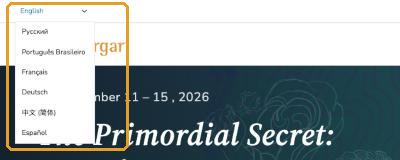
If the event had live interpretation, the recordings are available in those languages. Choose your language from the language menu at the top left of events.tergar.org. This changes the language of the recordings as well as the site.
Can I download them?
No. Recordings can only be watched on the event page.
If a recording won't play
Clear your browser's cache or open the page in a private window, then try another browser or device. See What if I have video playback issues on Tergar platforms?.
Related articles
- How do I access event teachings and Zoom webinar links?
- What if I have video playback issues on Tergar platforms?
Still have questions? Submit a ticket and our team will be happy to help.
Was this article helpful?
That’s Great!
Thank you for your feedback
Sorry! We couldn't be helpful
Thank you for your feedback
Feedback sent
We appreciate your effort and will try to fix the article